.NET 8 end of life and what to do before and after 10 November 2026
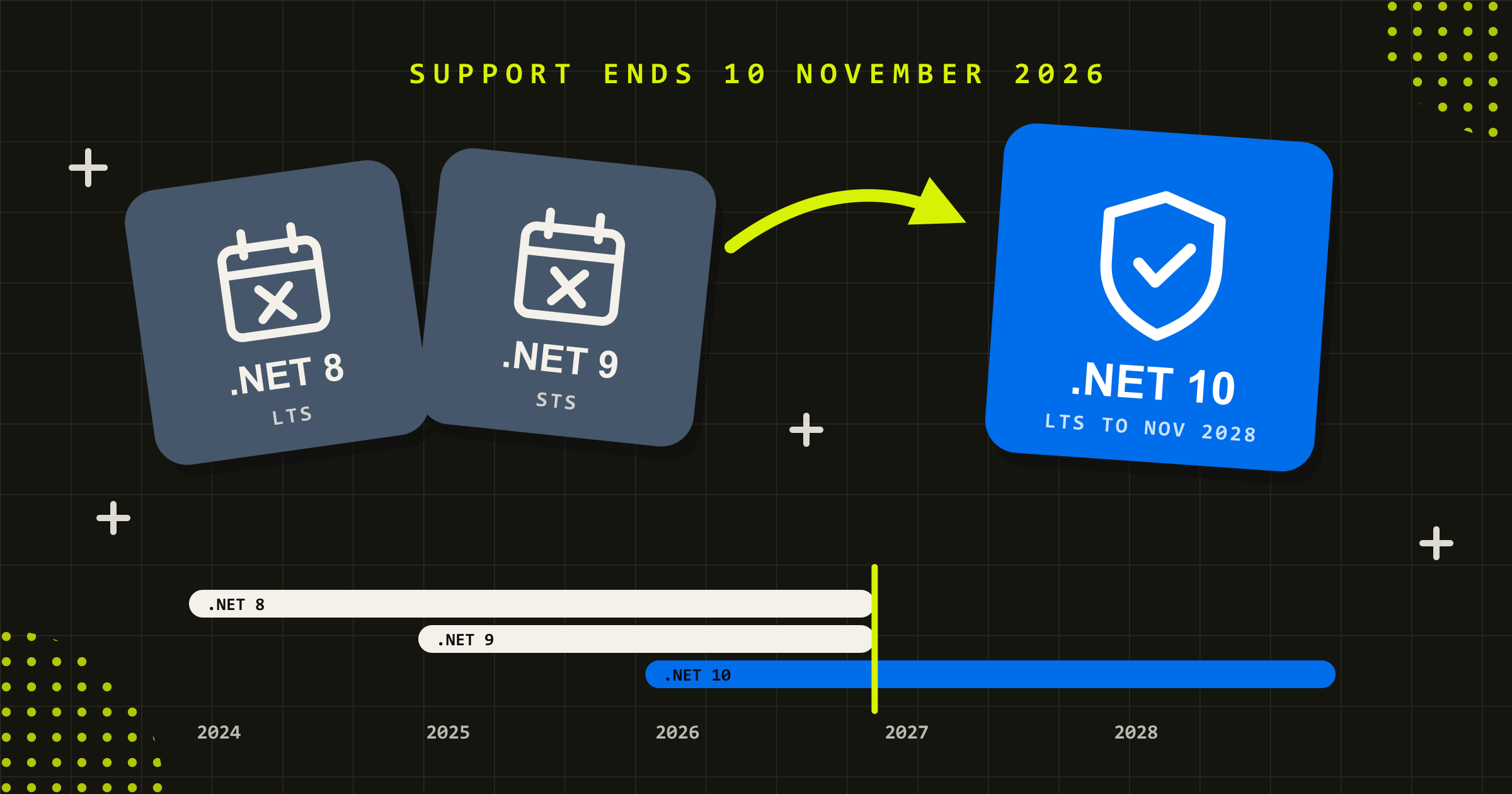
Quick answer: .NET 8 reaches end of life on Tuesday 10 November 2026, the day Microsoft ends support. .NET 9 ends the same day. Your applications will keep running, but they stop receiving security patches, bug fixes and Microsoft support, so every vulnerability found after that date stays open. The recommended path is an upgrade to .NET 10, the current long-term support release, which Microsoft supports until 14 November 2028. If you can’t finish before the deadline, plan it now and reduce exposure in the meantime.
The notice that puts .NET 8 on the agenda
It often starts small, with a cloud advisor notice, a line in a vulnerability scan or a question in a customer’s security questionnaire. Which runtime versions are your systems on, and are they supported? For a lot of organisations the answer for at least one system is .NET 8, and the people who built it may have moved on.
The deadline is fixed. Microsoft’s .NET support policy lists 10 November 2026 as the end of support for both .NET 8 and .NET 9, and the .NET team confirmed the date in June 2026. What isn’t fixed is how you respond, and that choice decides whether this is a planned piece of work or an emergency in the new year.
What .NET 8 end of life means on 10 November
Nothing visible happens on the day. Your web apps, APIs and background services keep running as they did on the 9th, which is why the date is easy to miss.
After .NET 8 end of support, Microsoft no longer ships fixes, security updates or technical assistance for that version. Microsoft releases .NET patches on Patch Tuesday, and each patch closes the vulnerabilities found since the last one. From 10 November, any new vulnerability in the .NET 8 runtime or its ASP.NET Core libraries stays open on your systems, and the list only grows.
The final six months of any .NET release are already a maintenance period, where Microsoft fixes security issues only. So .NET 8 has received security fixes only since May. Microsoft’s own guidance is blunt. Running an out-of-support version “may put your applications, application data, and computing environment at risk”.
If you can’t finish the upgrade before 10 November
Missing the date is manageable if the exposure is reduced while the upgrade is planned. These five steps do that.
- Start with what faces the internet. Public websites, customer portals and APIs carry the most risk, so they go first in the upgrade order.
- Narrow access to internal apps. An internal tool that only staff use can sit behind a company sign-in such as Microsoft Entra ID, or be limited to your own network (on Azure App Service, with access restrictions), so only staff can reach it while it waits its turn.
- Confirm you have the source code and the keys. Check that you hold the code repository, the build pipeline and admin access to the hosting accounts. If a contractor built the app and has moved on, this step often turns up a gap.
- Turn on monitoring and alerts. Errors, unusual traffic and failed sign-ins should reach a person, so a problem shows up quickly.
- Put a date on the upgrade. A booked date with an owner gives a security questionnaire or an auditor a concrete answer until the upgrade ships.
.NET 9 reaches end of support on the same day
If your team moved to .NET 9 last year to get ahead of this, check the date again.
.NET 9 is a Standard Term Support release. In September 2025 Microsoft extended STS support from 18 to 24 months, starting with .NET 9, which moved its end date to 10 November 2026. That puts the .NET 8 (long-term) and .NET 9 (standard-term) lines on the same Patch Tuesday for end of support.
In practice, an upgrade from .NET 8 to .NET 9 now buys no time at all. The only supported target after 10 November is .NET 10.
Why an unsupported runtime becomes your problem quickly
“It still works” is true for a while. The cost shows up in three places, usually in this order.
- Security exposure. Every unpatched vulnerability stays open to anyone who scans for it, especially on internet-facing systems such as portals, APIs and public websites. The longer a system sits on an unsupported runtime, the more known weaknesses it carries.
- Compliance findings. Under the Australian Signals Directorate’s Essential Eight, online services that vendors no longer support are expected to be removed at every maturity level, and the scope widens to other applications at the highest level. For organisations assessed against the Essential Eight, an unsupported runtime on an online service is a finding waiting to be written up.
- Customer and procurement questions. Enterprise and government customers ask suppliers which runtimes and frameworks their systems use and whether they are supported. “We’re planning to upgrade” is a weaker answer every month after the deadline.
None of this means switching anything off on 11 November. It means the risk compounds, and the upgrade gets more urgent the longer it waits.
Four options when .NET 8 reaches end of life
So the question isn’t whether to act. It’s which of four things to do, system by system.
- Upgrade in place to .NET 10. For most well-built applications this is the right answer. .NET 10 is the current long-term support (LTS) release, supported until 14 November 2028. The code stays recognisably the same; the effort sits in the target framework, the dependencies, the build and deployment pipeline, and testing.
- Bridge with third-party extended support. Some vendors sell paid security patching for .NET versions Microsoft no longer supports. This can be a sensible stopgap for a system you will retire or rebuild within a year, but the upgrade still has to happen.
- Re-platform or rebuild. If the system was already struggling (hard to change, poorly tested, built on libraries that are themselves abandoned), the end-of-life date is a reasonable moment to treat it as an application modernisation project rather than a version bump. Scope it carefully, because a rebuild is a bigger decision than a deadline.
- Retire it. Some systems exist because nobody turned them off. If a system has few users or its job has moved elsewhere, retiring it is the cheapest and most secure option.
Most organisations end up with a mix. They upgrade the systems that matter, retire the ones that don’t, and modernise the one that has been holding everything back.
A six-step plan for the upgrade to .NET 10
This is the sequence we use for runtime upgrades, applied here to a .NET 8 or 9 system moving to .NET 10, whether we built it or it comes to us from another team.
- Inventory every system and where it runs. List each application, its target framework, where it’s hosted (App Service, containers, VMs, functions) and who owns it. Container base images and build agents count; they often pin a runtime separately from the code.
- Audit the dependencies. Check every NuGet package and third-party component for .NET 10 support. Abandoned or out-of-date packages are the most common cause of a slow upgrade, so find them first.
- Upgrade on a branch. Retarget to .NET 10, update packages, and resolve breaking changes using Microsoft’s migration guidance. Keep the change set focused on the upgrade; new features can wait.
- Test what the business depends on. Run the automated suite, then regression-test the flows people rely on, such as sign-in, payments, integrations and reports. Upgrades rarely break the obvious things. They break the integration nobody remembered.
- Release with a way back. Deploy through your normal pipeline in a low-traffic window, with a tested rollback. Update the hosting configuration as well as the code, so the platform itself runs .NET 10.
- Monitor, then document. Watch errors and performance for a couple of weeks, then record the new versions, the decisions made and anything deferred, so the next upgrade starts from a known position.
What makes a .NET upgrade quick or slow
The question every manager asks is how long it will take. The answer depends less on the size of the codebase than on four things.
- Test coverage. Good automated tests turn an upgrade into a mostly mechanical job. Without them, most of the effort is manual regression testing.
- Dependency health. Current, maintained packages upgrade cleanly. A system that has drifted for years usually needs several dependencies replaced.
- Deployment maturity. A repeatable CI/CD pipeline makes release and rollback routine. Manual deployments add risk and time.
- Knowledge of the system. If the original team is gone, the first stage of the upgrade is learning the system before changing it. That is often the biggest variable for systems first built by another team.
A focused application with tests and a pipeline is a short job. A large system with drifted dependencies and no tests is a project. The inventory and dependency audit in steps one and two tell you which you have, which is why they come first.
Put the platform on a cycle so November 2028 isn’t the next emergency
Upgrading to .NET 10 buys you until November 2028. Organisations that avoid this scramble next time treat runtime upgrades as a regular cycle. Dependencies are updated monthly, the next end-of-life date sits in the support plan, and the upgrade is scheduled a year ahead.
That is most of what good ongoing support looks like for a custom platform. We’ve designed, built and supported software since 2008, including platforms on Microsoft Azure. If your .NET 8 apps were built by a developer or agency that has since moved on, we can review the code and hosting, upgrade them to .NET 10 and test them as a one-off project, then hand them back to your team or keep them current under a software support and maintenance agreement. We start with that review so you know where each system stands before you commit. Our custom software development team handles the bigger re-platforming decisions when an upgrade isn’t enough.
The deadline is the same for everyone. The difference is whether you meet it on a plan or in a hurry.
Questions about .NET 8 end of life
When does .NET 8 reach end of life?
Microsoft ends support for .NET 8 on Tuesday 10 November 2026, three years after its release in November 2023. After that date it receives no security patches, bug fixes or technical support. .NET 9 reaches end of support on the same day, because Microsoft extended standard-term releases to 24 months in 2025.
What happens if we keep running .NET 8 after end of support?
Your applications keep working, but new vulnerabilities in the runtime and ASP.NET Core are no longer fixed, so security exposure grows every month. Unsupported software can also be flagged in Essential Eight assessments, customer security reviews and procurement. Microsoft strongly recommends against running out-of-support versions. If a system has already failed or been breached, start at our emergency help page.
Should we upgrade from .NET 8 to .NET 9 or .NET 10?
.NET 10. It is the current long-term support release, supported until 14 November 2028. .NET 9 reaches end of support on the same day as .NET 8, so upgrading to it gains nothing. Go straight to .NET 10.
How long does a .NET 8 to .NET 10 upgrade take?
It depends on test coverage, dependency health, deployment maturity and how well the system is understood, more than on the size of the code. A well-tested application with a modern pipeline is a short job. A large system with outdated dependencies and no tests becomes a project. An inventory and dependency audit tells you which you have.
Does .NET Framework 4.8 have the same end-of-life date?
No. .NET Framework 4.x is a separate product that follows Microsoft’s component lifecycle policy, so its support follows the version of Windows it is installed on. The 10 November 2026 date applies to modern .NET (.NET 8 and .NET 9). If you run .NET Framework applications, check Microsoft’s .NET Framework lifecycle page separately. Moving them to modern .NET is usually a larger piece of work.


Can you upgrade a .NET application someone else built?
Yes. We upgrade and support systems built by other agencies, contractors and in-house teams. We start with a review of the codebase, dependencies and infrastructure, agree the scope and risks, then upgrade, test and release. If you need ongoing support afterwards, the upgrade becomes the first piece of work under a service level agreement.
Simon Krambousanos
More from the Journal