WCAG 2.2: a practical compliance guide for Australian organisations
Quick answer: WCAG 2.2 is the current version of the Web Content Accessibility Guidelines, published by the W3C in October 2023. It adds nine success criteria, six of them at Levels A and AA, and removes one. Level AA is the practical target: it means meeting every A and AA criterion. In Australia, federal agencies must meet the latest version of WCAG, and the Disability Discrimination Act has applied to websites since the Sydney Olympics case in 2000.
One in five Australians has a disability. The ABS counted 5.5 million people in its 2022 Survey of Disability, Ageing and Carers, 21.4 per cent of the population, rising to 52.3 per cent of people aged 65 and over. They use the same forms, portals and apps as everyone else.
The websites they rely on still fail them in measurable ways. When WebAIM tested the home pages of the top one million websites in February 2026, 95.9 per cent had detectable WCAG failures, averaging 56 errors a page. And those are only the failures a machine can find.
WCAG 2.2 is the standard that defines what accessible means in practice. This guide covers what changed in 2.2, what Level AA asks of you, how the rules apply in Australia, and how to audit and fix a site so accessibility stops being a last-minute scramble before launch.
What WCAG 2.2 is, and why Level AA is the target
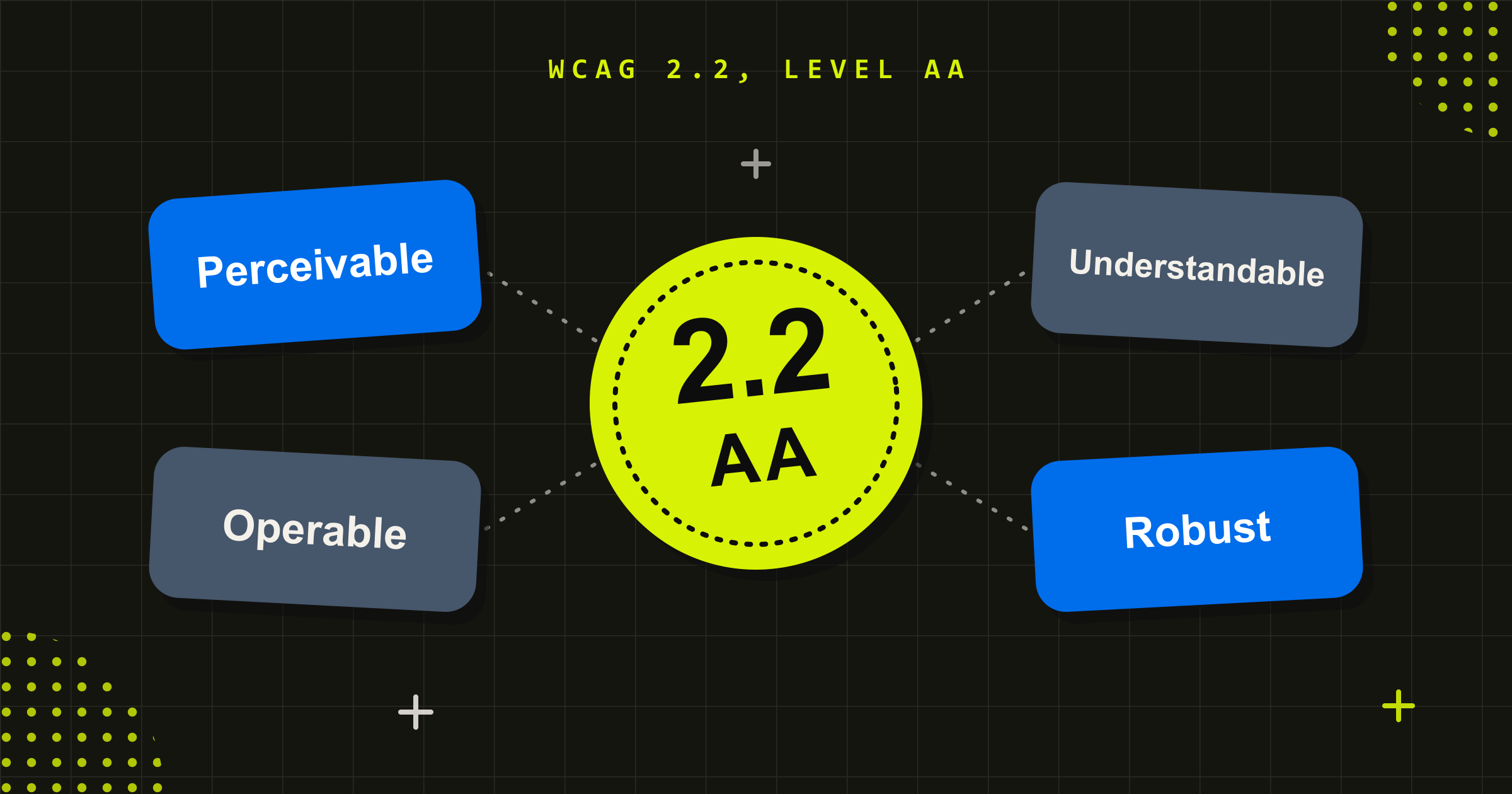
The Web Content Accessibility Guidelines are published by the W3C’s Web Accessibility Initiative. WCAG 2.2 is organised around four principles. Content has to be:
- Perceivable: people can take in the information, whether they see it, hear it or read it with a screen reader.
- Operable: people can use every control, including with a keyboard, a switch or voice.
- Understandable: the content and the interface behave in ways people can follow.
- Robust: the content works with the browsers and assistive technologies people rely on.
Under those principles sit testable success criteria at three levels: A, AA and AAA. Meeting Level AA means meeting every A and every AA criterion. The W3C itself advises against requiring Level AAA as a general policy for entire sites, because some content cannot satisfy every AAA criterion. That makes AA the practical target, and it is the level federal agencies such as the Department of the Prime Minister and Cabinet commit to.
WCAG 2.2 is also backwards compatible. A page that conforms to 2.2 is at least as accessible as one that conforms to 2.1, so moving to 2.2 means closing a gap rather than starting again.
What changed in WCAG 2.2: six new criteria at A and AA
WCAG 2.2 adds nine success criteria. Three are at AAA. These are the six that matter for an AA target, summarised from the W3C’s own descriptions:
- Focus Not Obscured (Minimum), AA. When an element receives keyboard focus, it must be at least partly visible, not completely covered by a sticky header, cookie banner or chat widget. People who navigate by keyboard need to see where they are.
- Dragging Movements, AA. Anything that works by dragging, such as a slider, a map or a reorderable list, needs a simple pointer alternative like a tap or a click. Some people cannot drag at all.
- Target Size (Minimum), AA. Buttons and links must be at least 24 by 24 CSS pixels, or have enough space around them. Small targets packed close together are hard to hit for people with limited fine motor control.
- Consistent Help, A. If help (a phone number, a chat link, a contact form) appears on several pages, put it in the same place each time.
- Redundant Entry, A. Don’t ask for the same information twice in the same process. Pre-fill it or let people select it. This matters most for people with cognitive disabilities who find it hard to recall what they entered earlier.
- Accessible Authentication (Minimum), AA. Logging in must not depend on solving a puzzle, remembering a password or retyping a code, unless there is an alternative or some assistance, such as support for password managers and copy and paste.
WCAG 2.2 also removed one criterion, 4.1.1 Parsing, which the W3C now treats as obsolete.
If your site already meets 2.1 AA, these six are the gap to close. Check login flows and dense mobile screens first: authentication and target size are where the new criteria are most specific.
The WCAG failures that appear most often
The new criteria get the attention, but the failures that turn up most are much older. WebAIM’s 2026 scan found that six types account for 96 per cent of all detected errors:
- Low-contrast text (83.9 per cent of home pages)
- Images missing alternative text (53.1 per cent)
- Form inputs without labels (51 per cent)
- Empty links (46.3 per cent)
- Empty buttons (30.6 per cent)
- Missing page language (13.5 per cent)
Every one of these is a design-system or template problem. Fix the colour palette, the image component and the form field once, and the fix carries across every page that uses them.
WCAG 2.2 compliance in Australia: what the rules say
Australia has no single law that names WCAG for every organisation. Three sources set the expectation.
The Disability Discrimination Act 1992. The DDA has applied to websites since 2000, when the Human Rights and Equal Opportunity Commission upheld a complaint from Bruce Maguire, a web user who has been blind from birth, that the Sydney Olympics website was inaccessible. The Commission found the Sydney Organising Committee for the Olympic Games in breach of the DDA and ordered it to pay $20,000. SOCOG had argued that fixing its results tables would cost $2.2 million over 368 working days; the complainant’s witnesses said a small team could do it in about four weeks (W3C case study).
The Australian Government’s Digital Experience Policy. For federal agencies in scope, the Digital Service Standard (criterion 3, “Leave no one behind”) and the Digital Inclusion Standard require services to comply with the DDA and “the latest version of the Web Content Accessibility Guidelines”. Today that means WCAG 2.2. The policy does not apply to state and territory services, although the DTA encourages agencies outside its mandatory scope to adopt it.
The Australian Human Rights Commission’s guidelines. In 2025 the Commission published Guidelines on Equal Access to Digital Goods and Services, setting out what organisations should do to meet their obligations under the DDA.
This is general information rather than legal advice. The practical reading is simple: if you deliver a service to the public, WCAG 2.2 AA is the benchmark to work to.
How to run a WCAG 2.2 accessibility audit
An audit that tests every page equally produces a long list and little progress. This is the six-step sequence we use, built around the tasks people come to the service to complete:
- Scope by task, then by template. List the tasks that matter most (apply, pay, book, log in, get help) and the page templates and components behind them. A form component used on 200 pages is one test, not 200.
- Run automated scans across the scope. Tools such as WAVE and axe quickly catch contrast, missing labels and missing alternative text. Treat the results as a starting list: as WebAIM notes, not every failure can be detected automatically, and a clean scan does not mean a page is accessible.
- Test manually. Complete each key task using only a keyboard, then with a screen reader (NVDA or JAWS on Windows, VoiceOver on iOS and macOS), then zoomed in. Check the six new 2.2 criteria by hand: focus visibility, dragging alternatives, target size, consistent help, repeated entry and the login flow.
- Test with people with disability. Tools and expert reviews find conformance failures. People with lived experience find the places where a technically conformant service is still hard to use.
- Prioritise by impact. Fix blockers on key tasks first (a form that can’t be submitted by keyboard, a login that locks out password managers), then shared components, because one fix there repairs many pages.
- Fix, retest and keep it in the release process. Retest every fix with the same method that found it, publish an accessibility statement that says what you meet and what you are still working on, and add accessibility checks to your definition of done so the next release doesn’t undo the work.
For the Department of Health and Human Services (DHHS), we worked onsite with the department to run automated accessibility tests on the MARAM platform, then used manual testing to validate the errors they surfaced. The result was a clear picture for the project’s stakeholders of where accessibility rules were being broken, why each issue was flagged, and how to fix it.
Step four takes the most preparation, because the research itself has to be accessible. For the NDIS Quality and Safeguards Commission, we partnered with Noble Me, a disability advocacy organisation, to design research that people with disability could take part in fully: accessible facilitation guides, interview formats, communication methods and participant support. That is what turns a compliance report into a service people can use.
Build WCAG 2.2 in from the start, so the audit confirms rather than rescues
Accessibility costs least at the point where decisions are made: when the colour palette is chosen, when the focus style is designed, when the form component is built. An audit run at the end of a project can only report what was decided months earlier.
The design system is where this pays off. For DHHS, we ran an accessibility assessment to make sure the department’s design library met WCAG 2.0 AA, the standard at the time. That is where an assessment pays off most: teams building from an accessible library don’t have to fix the same contrast and labelling issues page by page.
Some services need to go further than AA. The Victorian Electoral Commission’s Voters Voice app was built for an estimated 280,000 to 300,000 Victorians with communication difficulties. We designed it using the WCAG 2.0 AAA framework, delivered instructions in Auslan and simplified English, chose native iOS partly for its compatibility with screen readers, and tested prototypes with representative users after concept workshops with the VEC and Scope. The project is estimated to have saved around AU$1 million by replacing printed communication boards and interpreters. AAA across a whole website isn’t recommended, but for a tool built specifically for people with communication difficulties, aiming higher was the right call.
Since 2008, Conduct has designed and built digital services for government, health and not-for-profit organisations, and we sit on five Australian government panels. Whether you need a WCAG 2.2 accessibility audit of an existing service, or accessibility designed into a new one from the first wireframe (see our UX and UI design and user research services), talk to us. If you are mapping where a service lets people down, our guide to customer journey mapping is a good companion to an audit.
Accessibility isn’t the last task before launch. It’s whether the service works for one in five of the people it exists to serve.
Frequently asked questions
What is WCAG 2.2?
WCAG 2.2 is the current version of the Web Content Accessibility Guidelines, published by the W3C in October 2023. It sets out testable success criteria, at Levels A, AA and AAA, for making web content usable by people with disability. Compared with WCAG 2.1, it adds nine criteria (six at A and AA) and removes 4.1.1 Parsing. Level AA is the usual target.
Is WCAG 2.2 mandatory in Australia?
For federal agencies covered by the Digital Experience Policy, yes: the Digital Service Standard requires compliance with the latest version of WCAG, which is 2.2. For other organisations no law names WCAG directly, but the Disability Discrimination Act applies to websites and digital services, and WCAG 2.2 AA is the technical standard used to show a service is accessible. This is general information, not legal advice.
What is the difference between WCAG 2.1 and 2.2?
WCAG 2.2 keeps everything in 2.1 except 4.1.1 Parsing, which was removed as obsolete, and adds nine success criteria. The six at Levels A and AA cover visible keyboard focus, alternatives to dragging, minimum target size (24 by 24 CSS pixels), consistent placement of help, not asking for the same information twice, and login that doesn’t rely on memory or puzzles.
What does WCAG 2.2 AA compliance mean?
It means a page meets every Level A and every Level AA success criterion in WCAG 2.2. Level A covers the most basic barriers, such as missing text alternatives and form labels, and AA adds requirements such as colour contrast, visible focus and minimum target size. The W3C advises against requiring AAA across entire sites, which is why AA is the usual target.
Can an automated tool make my site WCAG 2.2 compliant?
No. Automated scanners such as WAVE and axe are a fast first pass and catch common problems like low contrast and missing labels, but they cannot detect every failure. WebAIM, which makes WAVE, notes that a clean automated result does not mean a page is accessible. A credible audit combines automated scans with manual keyboard and screen reader testing, and testing with people with disability.

Does WCAG apply to mobile apps and documents?
WCAG is written for web content, but its principles apply well beyond websites. The W3C publishes WCAG2ICT guidance on applying WCAG to non-web documents and software, and the Australian Government’s standards apply to digital services, not only websites. If people use it to access your service, it should meet the same standard.
Simon Krambousanos
More from the Journal